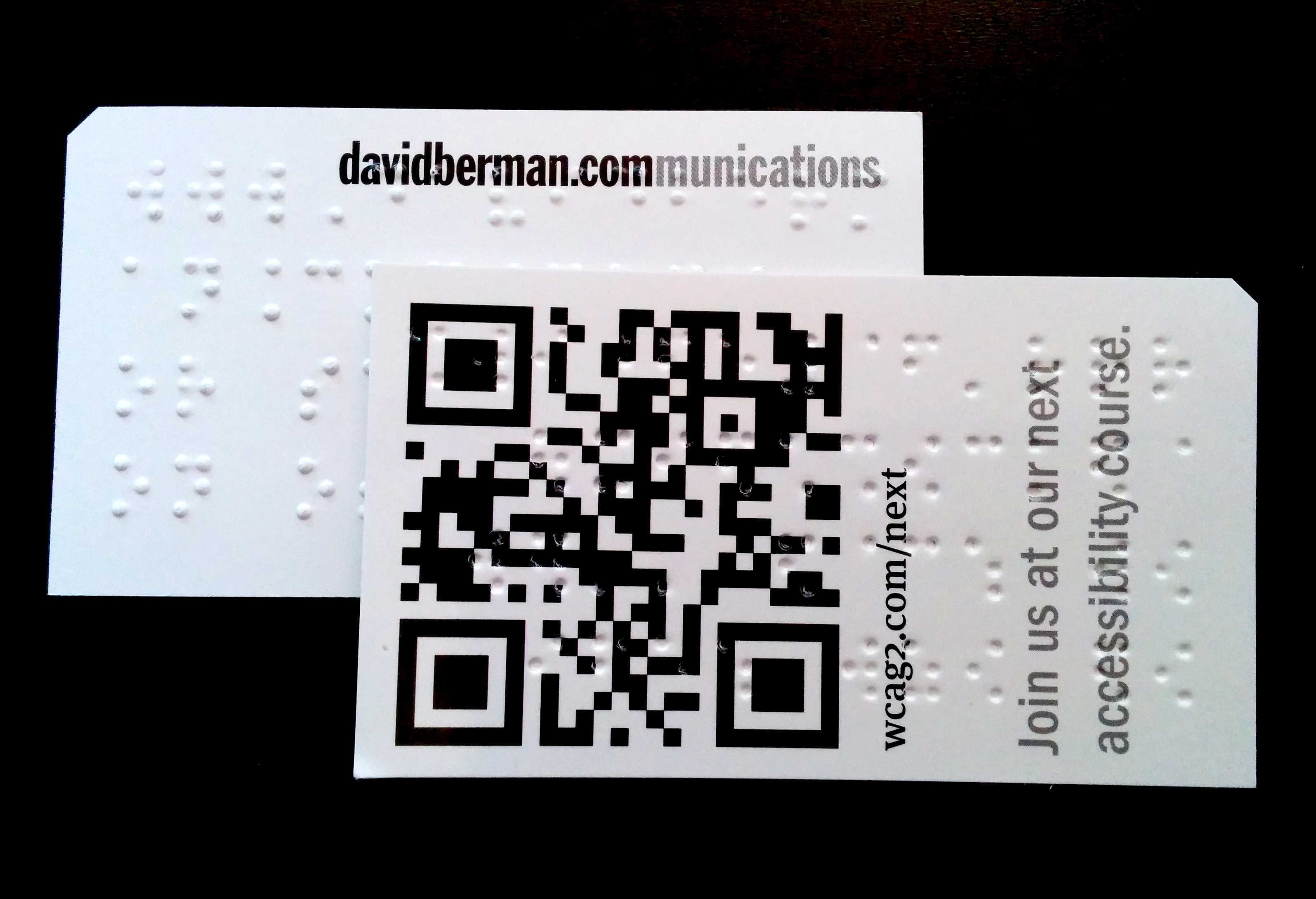
Front and Back of David Berman Communications next event cards
We are proud of the amazing progress over the past decade in making accessible digital versions of paper documents available for people with disabilities. When our organization distributes a physical document (such as an evaluation form or a certificate at one of our courses), we follow the best practice of including a prominent message telling people how they can get an accessible electronic equivalent. Many other organizations are doing the same. But if someone can’t see that message, how can they know the accessible alternative exists, let alone know what the document is in the first place?
Solution: Let’s cut corners!
We wanted to invent a simple, inexpensive standard that allows people to identify a physical document without using their eyes, as well as link to its accessible digital equivalent—all without the expensive and time-consuming process of adding braille.
The result of our design research is called the “Berman Corner.” Here’s how it works:
A printed document (a business card, a handout, a magazine) gets a tiny 45-degree cut of paper trimmed from one of its four corners. The cut is not large enough to get in the way of the printed message, but is large enough that a person who can’t see can notice that one of the corners is intentionally chopped. This tactile clue signals that within 3.5 inches of that corner there is a code that can be scanned, such as a QR code, that the person can activate with any barcode scanning app on their smartphone (e.g. Google Goggles). If they don’t find it on one side of the paper, they try the other side. The code identifies the document, contains all the document information, and/or takes them to the accessible equivalent online (perhaps a PDF or a Web page).
The cut corner is a very affordable approach. Scissors can be used for a single document, while commercial printers can very inexpensively shave a corner on a print job upon request. (We’d like to think that printers would even embrace providing such an accommodation at no charge.)
Meanwhile, QR codes cost nothing to create: there are many free online tools available. We’ve also invented a collaborative Google Sheet for generating free QR codes of various sizes. Contact me at bermancorner@davidberman.com so we can share that with you.
What if the person has no Web access? There is a new kind of scan code invented here in Canada by Cecitech that embeds the content of a document directly into the code itself! We’re already collaborating with Cecitech on its adoption.
This was all the result of design research, led by Khadija Safri, that included studying other attempts by public and private sector organizations to put indicators on documents, much like and electronic hotel room keys, and testing various prototypes with people who are blind. Regarding the size of the cut, we tested a range of shapes, sizes and positions. Thank you Kim Kilpatrick for your help during the process!
Result: Early excitement
At the recent International Summit on Accessibility 2014, I distributed a couple hundred cut cards to the audience, without explanation, and also handed out business cards in the corridors; the cards featured the Berman Corner as well as braille that explained the approach. We had visually impaired reps from several levels of government follow up with us, enthusiastically reporting that not only did they “get it,” they wanted to look into making it a standard within their organizations.
As usual, when we design for the extremes, everyone benefits: sighted users can also find benefit in having a QR code link to an electronic equivalent on every document, and so we anticipate that giving up real estate for that part of the solution should be welcomed by all.
And we’ve just begun: we’ve posted full instructions on how to apply the standard to your next project. Please try it, tell us how we can improve it, and post your examples!
Reviewed September 5, 2014
Hello,
I am a volunteer land steward in my hometown of Littleton, Massachusetts.
My conservation group is creating a braille nature trail along which there will be a post and rope guide system. We plan to have 8-10 rest stops along the way with benches and informational braille signage. At these stops we are planning to install audio stations where our vision impaired community members will be able to listen to descriptions of their surroundings.
We have thought about having QR codes and /or NFC tokens available at these stations that will play the audio files when a vision impaired person stops at the stations with a smart phone.
We wonder if you can give us advice on the best way to create the stations. We have made scripted narrations with human sounding voices which are much more appealing than computer generated synthesized voices.
Our concerns are, when a visitor scans the QR code or taps the NFC token there is an additional requirement to press a small button on their smart phone screen to activate the audio mp3 file. The additional button press is a security protocol by the iphone and android platforms. Is there a low cost or no cost way to have these audio files easily accessed by vision impaired persons? It appears that QR codes and NFC tokens will not be a totally hands-free option. We would like vision impaired persons to be able to activate the audio files with little effort. Not being vision impaired myself, I don’t know how much is too much to ask of our visitors with low or no vision. We want to make this trail as accessible as possible.
We would appreciate advice from anyone with experience in creating accessible braille trails. Thank you very much.
Hi Jim,
Thank you for reaching out about this.
It sounds like an excellently considered project, and the very best answer relies on several further factors.
I’m going to bring one or two of my colleagues with lived experience and technical experience with such systems, and respond to you directly via email.
You’ll hear from me soon.
– David
Hi I am making three note books for wheelchair photographer, as I am in a wheelchair myself. I know through university that visually impaired people like photography too, so my plan is to have these books read, and the way to access the reading part I want to use a QR code, how much would it cost to have these QR codes with braille saying something along the lines of this QR code will take you to where the book is read allowed.
I hope this makes sense, and I look forward to hearing from you.
Many thanks
Darran
Hi Darren, what a great project!
Regarding the QR codes themselves, there are many free QR code building tools online; we’ll be pleased to make them for you at no cost, if that would help you succeed.
Regarding the ‘with braille’ part, it depends on how many you are making. if just a few, you can get a Dymo braille handheld labeller and punch out a few sentences. if you are printing many items that would need brailling, then you’d go to a local printer who specializes in this… i’d suggest Googling to find such a business near Plymouth or contact the RNIB who undoubtedly has a list of providers all over the UK.
[…] so that the screen reader can open the website. For printed materials, you should use the “Berman Corner,” a 45-degree cut on the top, left corner of the page that indicates there is a matrix barcode within […]
Great job trying to make tourist spots accessible for blind